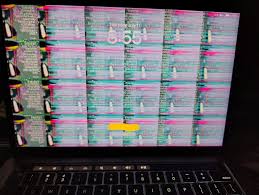
If you’re running macOS Ventura or later on an older Mac using OpenCore Legacy Patcher (OCLP), you’ve probably encountered the dreaded pink screens, graphical glitches, and random freezes in apps like Discord, VS Code, Slack, and Chrome. After months of manually applying fixes to individual apps, I created a comprehensive Python script that automates the entire process for over 150 known Electron and Chromium-based applications.
The Problem: Legacy GPUs Meet Modern macOS
When Apple dropped support for older Macs, the community responded with OpenCore Legacy Patcher—a brilliant tool that lets us run Ventura, Sonoma, and beyond on machines with AMD GCN 1-3 or Nvidia Kepler GPUs. The patches work remarkably well for most things, but there’s a catch: Electron and Chromium-based apps default to using the Metal ANGLE backend for graphics rendering, which doesn’t play nicely with the legacy GPU drivers.
The symptoms are unmistakable: red or pink tinted screens, UI elements that refuse to render, flickering windows, and apps that freeze entirely. For anyone who relies on Discord, Visual Studio Code, Notion, or even Chrome for daily work, this makes OCLP Macs feel unusable.
The Solution: Force OpenGL Rendering
The fix is straightforward in concept—force these apps to use OpenGL instead of Metal by passing the --use-angle=gl flag at launch. But implementing this across dozens of apps, each with different configuration files and behaviors, becomes tedious fast. That’s where this script comes in.
https://github.com/marcosfermin/electron_patcher_oclp_full/
What the Script Does
The Electron Patcher for OCLP systems takes three different approaches to fix rendering issues, automatically choosing the right method for each app:
1. Local State Patching — For Chromium-based browsers and some Electron apps, the script modifies the Local State JSON file to enable the use-angle@1 experiment flag. This tells the browser to use OpenGL instead of Metal without any modification to the app itself.
2. Executable Wrapping — For apps that ignore Local State settings (like VS Code and Signal), the script creates a wrapper that intercepts the launch and injects the --use-angle=gl flag. The original executable is backed up and preserved, so you can always restore to the original state.
3. Settings File Patching — Some apps like 1Password, Docker Desktop, and Slack have their own hardware acceleration settings. The script finds and modifies these configuration files to disable hardware acceleration or enable compatible rendering modes.
Comprehensive App Coverage
The script includes configurations for over 150 applications across multiple categories:
Web Browsers — Chrome, Edge, Brave, Vivaldi, Opera, Arc, Sidekick, Wavebox, and more
Communication — Discord, Slack, Microsoft Teams, Signal, Telegram, Element, Zoom, Skype, and various messaging aggregators like Ferdium and Franz
Development Tools — Visual Studio Code, Cursor, Windsurf, Postman, Insomnia, Docker Desktop, GitHub Desktop, GitKraken, MongoDB Compass, Figma, and many more
Productivity — Notion, Obsidian, Logseq, Todoist, Linear, Miro, Airtable, and numerous note-taking and project management apps
Media — Spotify, Tidal, Plex, Plexamp (with special handling for apps with helper processes)
Security — 1Password, Bitwarden, Dashlane, NordVPN, and other password managers and VPN clients
The script also correctly identifies native macOS apps (like Sublime Text, Bear, and iTerm2) that don’t need patching, avoiding unnecessary modifications.
Usage
Getting started is simple. First, see which of your installed apps need patching:
python3 electron_patcher_oclp_full.py --list-appsThis scans your system and shows the patch status of each detected app with clear indicators (✅ patched, ❌ not patched, ⚪ native app).
To apply patches with executable wrapping:
python3 electron_patcher_oclp_full.py --patch-executables --verboseIf you want to see what would happen without making changes:
python3 electron_patcher_oclp_full.py --patch-executables --dry-runAnd if something goes wrong or you need to restore the original state:
python3 electron_patcher_oclp_full.py --restoreHow the Wrapper Script Works
When patching executables, the script performs a surgical modification. It backs up the original binary with a .oclp-original suffix, then replaces it with a bash wrapper script that looks something like this:
#!/bin/bash
# OCLP-WRAPPER-SCRIPT
# Original executable backed up to: Discord.oclp-original

ORIGINAL_EXEC="/Applications/Discord.app/Contents/MacOS/Discord.oclp-original"

exec "$ORIGINAL_EXEC" --use-angle=gl "$@"
After creating the wrapper, the script automatically re-signs the app bundle using ad-hoc code signing to prevent macOS from complaining about invalid signatures. If the automatic signing fails, it provides the exact codesign command you need to run with sudo.
Important Considerations
App Updates — When apps update, they typically replace the executable, removing the wrapper. You’ll need to re-run the script after updates. Consider adding it to your maintenance routine or creating a post-update hook.
Spotify Special Case — Spotify uses helper processes that break when the main executable is wrapped. The script handles Spotify through Local State patching only. If you need reliable Spotify fixes, consider creating a launcher app that runs Spotify with the --use-angle=gl flag.
Code Signing — Some apps may crash after patching if code signing fails. If this happens, run the codesign command manually with sudo.
Permissions — You may need to run the script with elevated privileges for apps installed in protected directories.
The Technical Details
Under the hood, the script uses Python’s standard library for most operations: pathlib for file handling, plistlib for reading app Info.plist files, json for configuration files, and subprocess for Spotlight searches and code signing. The app detection is smart—it first checks common installation paths, then falls back to Spotlight’s mdfind command using bundle identifiers for apps installed in non-standard locations.
Each app configuration is stored in a dataclass with specific paths, bundle IDs, and notes about particular behaviors or requirements. This makes it easy to add new apps or modify existing configurations as Electron apps evolve.
https://github.com/marcosfermin/electron_patcher_oclp_full/
Conclusion
If you’re committed to keeping an older Mac running with OCLP, graphical issues in Electron apps don’t have to be a dealbreaker. This script takes the tedium out of maintaining a working system, letting you batch-apply fixes across your entire app library in seconds.
The script is based on fixes documented in the OpenCore Legacy Patcher GitHub issues, compiled into an automated solution that respects the different behaviors of various apps.
For those of us who refuse to let perfectly good hardware become e-waste, tools like OCLP—and scripts like this one—make it possible to stay productive on machines Apple has left behind.
Have questions or found an app that needs to be added? The script is designed to be easily extensible—just add a new AppConfig entry with the appropriate paths and settings.