High-performance computing shouldn’t require a six-figure budget and a dedicated data center. I built Docker HPC Cluster—a fully containerized, production-ready HPC environment that you can spin up on your laptop, homelab, or cloud infrastructure in minutes.
The Problem
Traditional HPC cluster deployment is painful. You’re looking at weeks of configuration, complex dependency management, and the constant headache of keeping everything in sync across nodes. Want to test a SLURM job scheduler configuration? Good luck setting up bare-metal infrastructure just to experiment.
I wanted something different: an HPC environment that’s portable, reproducible, and scales from a single laptop to multi-node deployments without rewriting configuration files.
What I Built
The project delivers a complete HPC stack using containerization:
| Feature | Description |
|---|---|
| SLURM Workload Manager | Industry-standard job scheduler with accounting |
| Dynamic Scaling | Scale compute nodes up/down with a single command |
| GPU Support | NVIDIA GPU computing with CUDA 12.2 |
| Monitoring | Prometheus + Grafana dashboards out of the box |
| NFS Storage | Shared filesystem across all nodes |
| OpenMPI | Full MPI support for parallel computing |
| Scientific Stack | NumPy, SciPy, pandas, scikit-learn, mpi4py |
| Job Accounting | Full job history with MariaDB backend |
Architecture
The cluster uses a classic controller/compute topology, fully orchestrated through Docker Compose:
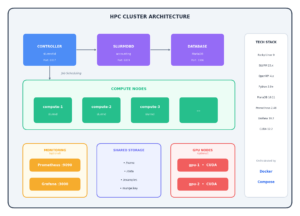
Each component runs in its own container with proper service discovery, shared Munge authentication, and persistent volumes for data and logs.
Prerequisites
Required
- Docker 20.10 or later
- Docker Compose 2.0 or later
- 8GB+ RAM (16GB recommended for larger clusters)
- 10GB+ disk space
Optional
- NVIDIA Container Toolkit (for GPU support)
Verify Installation
# Check Docker version
docker --version
# Docker version 24.0.0 or later

# Check Docker Compose version
docker compose version
# Docker Compose version v2.20.0 or later

# Check available memory
free -h  # Linux
vm_stat  # macOS

# For GPU support, verify NVIDIA runtime
docker run --rm --gpus all nvidia/cuda:12.2.0-base-rockylinux9 nvidia-smi
Installation
1. Clone or Create Directory
mkdir -p ~/hpc-cluster && cd ~/hpc-cluster
# Copy all files to this directory
2. Build Base Image
# Build the base image (required first)
docker build -t hpc-base:latest -f Dockerfile.base .
3. Build All Images
# Using Make
make build

# Or using Docker Compose
docker compose build
4. Start the Cluster
# Start with 4 compute nodes
make up NODES=4

# Or without Make
docker compose up -d --scale compute=4
5. Verify Installation
# Check all containers are running
docker compose ps

# Verify SLURM is operational
make status
# Or: docker exec hpc-controller sinfo
Quick Start
# 1. Build and start cluster
make up NODES=4

# 2. Wait for cluster to initialize (~60 seconds)
make status

# 3. Run a test job
make test

# 4. Access the controller
make shell

# 5. Submit your first job
srun hostname
Usage
Scaling
Scale compute nodes dynamically without restarting the cluster:
# Scale up to 8 nodes
make scale NODES=8

# Scale down to 2 nodes
make scale NODES=2

# Check node status
docker exec hpc-controller sinfo -N -l
GPU Support
Prerequisites
Install NVIDIA Container Toolkit:
# Ubuntu/Debian
distribution=$(. /etc/os-release;echo $ID$VERSION_ID)
curl -s -L https://nvidia.github.io/nvidia-docker/gpgkey | sudo apt-key add -
curl -s -L https://nvidia.github.io/nvidia-docker/$distribution/nvidia-docker.list | \
  sudo tee /etc/apt/sources.list.d/nvidia-docker.list
sudo apt-get update && sudo apt-get install -y nvidia-container-toolkit
sudo systemctl restart docker
Start GPU Cluster
# Build GPU image and start
make gpu NODES=2

# Or with Docker Compose
docker compose --profile gpu up -d --scale compute-gpu=2
Submit GPU Job
# Check GPU partition
sinfo -p gpu

# Submit GPU job
sbatch examples/gpu_job.sh

# Interactive GPU session
srun -p gpu --gres=gpu:1 --pty bash
Monitoring
Enable Monitoring Stack
# Start with Prometheus and Grafana
make monitoring NODES=4

# Or with Docker Compose
docker compose --profile monitoring up -d --scale compute=4
Access Dashboards
| Service | URL | Credentials |
|---|---|---|
| Grafana | http://localhost:3000 | admin / admin |
| Prometheus | http://localhost:9090 | – |
| cAdvisor | http://localhost:8080 | – |
Pre-configured Metrics
- CPU usage per node
- Memory utilization
- Network I/O
- Container metrics
- SLURM job statistics
Job Examples
Interactive Jobs
# Run single command
srun hostname

# Run on specific number of tasks
srun -n 4 hostname

# Interactive shell on compute node
srun --pty bash
Batch Jobs
# Submit batch job
sbatch examples/submit_job.sh

# Check job status
squeue

# View job details
scontrol show job <jobid>

# Cancel job
scancel <jobid>
MPI Jobs
# Compile MPI program
cd /home/hpcuser
mpicc -o hello_mpi /examples/hello_mpi.c

# Run interactively
srun -n 4 ./hello_mpi

# Submit as batch job
sbatch examples/multinode_mpi.sh
Array Jobs
# Submit array of 10 tasks
sbatch examples/array_job.sh

# Check array job status
squeue -u hpcuser

# Cancel specific array task
scancel <jobid>_5
Python MPI Jobs
# Monte Carlo Pi calculation
srun -n 4 python3 /examples/parallel_pi.py

# Matrix benchmark
srun -n 4 python3 /examples/matrix_benchmark.py
Parameter Sweeps
# Submit parameter sweep
sbatch examples/submit_sweep.sh

# Results saved to sweep_results_<jobid>/
GPU Jobs
# Submit GPU job
sbatch examples/gpu_job.sh

# Interactive GPU session
srun -p gpu --gres=gpu:1 python3 -c "import torch; print(torch.cuda.is_available())"
Command Reference
Make Commands
| Command | Description |
|---|---|
make help |
Show all available commands |
make build |
Build all Docker images |
make build-gpu |
Build GPU-enabled images |
make up NODES=N |
Start cluster with N compute nodes |
make down |
Stop the cluster |
make restart |
Restart the cluster |
make scale NODES=N |
Scale to N compute nodes |
make status |
Show cluster and job status |
make nodes |
Show detailed node information |
make jobs |
Show job queue |
make logs |
Follow all container logs |
make logs-controller |
Follow controller logs |
make logs-compute |
Follow compute node logs |
make shell |
Open root shell on controller |
make shell-user |
Open shell as hpcuser |
make test |
Run cluster tests |
make test-mpi |
Run MPI test job |
make test-python |
Run Python MPI test |
make examples |
Copy examples to controller |
make monitoring |
Start with monitoring stack |
make gpu |
Start with GPU nodes |
make backup |
Backup cluster data |
make clean |
Stop and remove containers |
make clean-volumes |
Remove all data volumes |
make clean-all |
Remove everything |
make info |
Show cluster information |
SLURM Commands
| Command | Description |
|---|---|
sinfo |
View cluster/partition status |
sinfo -N -l |
Detailed node list |
squeue |
View job queue |
squeue -u <user> |
View user’s jobs |
srun <cmd> |
Run interactive job |
srun -n N <cmd> |
Run with N tasks |
srun --pty bash |
Interactive shell |
sbatch <script> |
Submit batch job |
scancel <jobid> |
Cancel job |
scancel -u <user> |
Cancel all user’s jobs |
scontrol show job <id> |
Job details |
scontrol show node <n> |
Node details |
sacct |
Job accounting history |
sacct -j <jobid> |
Specific job accounting |
sstat -j <jobid> |
Running job statistics |
Useful Aliases (Pre-configured)
sq   # squeue
si   # sinfo
sc   # scancel
Configuration
Environment Variables
| Variable | Default | Description |
|---|---|---|
NODES |
2 | Number of compute nodes |
TZ |
UTC | Timezone |
MYSQL_ROOT_PASSWORD |
rootpassword | Database root password |
MYSQL_USER |
slurm | Database user |
MYSQL_PASSWORD |
slurmdbpass | Database password |
Compute Node Resources
Edit docker-compose.yml:
compute:
  deploy:
    resources:
      limits:
        cpus: '4'        # CPUs per node
        memory: 8G       # Memory per node
      reservations:
        cpus: '1'        # Minimum CPUs
        memory: 1G       # Minimum memory
SLURM Partitions
Edit config/slurm.conf:
# Default compute partition
PartitionName=compute Nodes=ALL Default=YES MaxTime=INFINITE State=UP

# Quick debug partition (1 hour max)
PartitionName=debug Nodes=ALL MaxTime=01:00:00 State=UP Priority=100

# GPU partition
PartitionName=gpu Nodes=ALL MaxTime=INFINITE State=UP

# High memory partition
PartitionName=highmem Nodes=ALL MaxTime=24:00:00 State=UP MinMemoryNode=16000
Job Defaults
Edit config/slurm.conf:
# Default job settings
DefMemPerCPU=1000          # 1GB per CPU
MaxJobCount=10000          # Max queued jobs
MaxArraySize=1001          # Max array size
File Structure
hpc/
├── docker-compose.yml           # Main orchestration file
├── Makefile                     # Management commands
├── README.md                    # This file
│
├── Dockerfile.base              # Base image with SLURM/MPI
├── Dockerfile.controller        # Controller node
├── Dockerfile.compute           # Compute nodes
├── Dockerfile.slurmdbd          # Database daemon
├── Dockerfile.gpu               # GPU-enabled nodes
├── Dockerfile.nfs               # NFS server
│
├── config/
│   ├── slurm.conf              # SLURM configuration
│   ├── slurmdbd.conf           # Database daemon config
│   ├── cgroup.conf             # Cgroup configuration
│   └── gres.conf               # GPU resource config
│
├── scripts/
│   ├── start-controller.sh     # Controller startup
│   ├── start-compute.sh        # Compute node startup
│   ├── start-slurmdbd.sh       # Database daemon startup
│   ├── start-gpu-compute.sh    # GPU node startup
│   ├── start-nfs.sh            # NFS server startup
│   └── generate-munge-key.sh   # Munge key generator
│
├── monitoring/
│   ├── prometheus.yml          # Prometheus configuration
│   └── grafana/
│       └── provisioning/
│           ├── dashboards/
│           │   ├── dashboards.yml
│           │   └── hpc-cluster.json
│           └── datasources/
│               └── datasources.yml
│
└── examples/
    ├── hello_mpi.c             # MPI hello world (C)
    ├── parallel_pi.py          # Monte Carlo Pi (Python)
    ├── matrix_benchmark.py     # Matrix benchmark
    ├── parameter_sweep.py      # Parameter sweep example
    ├── submit_job.sh           # Basic batch job
    ├── multinode_mpi.sh        # Multi-node MPI
    ├── array_job.sh            # Array job
    ├── gpu_job.sh              # GPU job
    ├── submit_pi.sh            # Python MPI job
    └── submit_sweep.sh         # Parameter sweep job
Troubleshooting
Common Issues
Cluster Won’t Start
# Check container status
docker compose ps -a

# View startup logs
docker compose logs

# Rebuild images
make clean && make build && make up NODES=4
Nodes Not Registering
# Check compute node logs
docker compose logs compute

# Verify munge authentication
docker exec hpc-controller munge -n | unmunge

# Restart compute nodes
docker compose restart compute
Jobs Stuck in Pending
# Check why job is pending
scontrol show job <jobid> | grep Reason

# Check node availability
sinfo -N -l

# Check resource requests
squeue -o "%.10i %.9P %.8j %.8u %.8T %.10M %.9l %.6D %.20R"
Database Issues
# Check database connectivity
docker exec hpc-database mysql -u slurm -pslurmdbpass -e "SELECT 1"

# View slurmdbd logs
docker compose logs slurmdbd

# Restart database services
docker compose restart database slurmdbd
Munge Authentication Failures
# Check munge is running
docker exec hpc-controller pgrep munged

# Test munge
docker exec hpc-controller munge -n | unmunge

# Regenerate munge key (requires restart)
docker compose down
docker volume rm hpc-munge-key
make up NODES=4
Debug Mode
# Run with verbose logging
docker compose up --scale compute=2

# Check SLURM debug logs
docker exec hpc-controller tail -f /var/log/slurm/slurmctld.log

# Check compute node logs
docker exec hpc-hpc-compute-1 tail -f /var/log/slurm/slurmd.log
Performance Tuning
Memory Settings
# docker-compose.yml
compute:
  deploy:
    resources:
      limits:
        memory: 8G
  environment:
    - SLURM_MEM_PER_NODE=8000
CPU Pinning
# config/slurm.conf
TaskPlugin=task/affinity
TaskPluginParam=cores
Network Optimization
# docker-compose.yml
networks:
  hpc-network:
    driver: bridge
    driver_opts:
      com.docker.network.driver.mtu: 9000
MPI Tuning
# In job scripts
export OMPI_MCA_btl_tcp_if_include=eth0
export OMPI_MCA_mpi_yield_when_idle=1
Security
Default Credentials
| Service | Username | Password |
|---|---|---|
| MariaDB root | root | rootpassword |
| MariaDB slurm | slurm | slurmdbpass |
| Grafana | admin | admin |
| SSH (hpcuser) | hpcuser | (key-based) |
Recommendations for Production
- Change default passwords in
docker-compose.ymlandconfig/slurmdbd.conf - Enable TLS for Grafana and Prometheus
- Restrict network access using firewall rules
- Use secrets management for sensitive data
- Enable SLURM accounting for audit trails
Cleanup
# Stop cluster (preserves data)
make down

# Stop and remove containers
make clean

# Remove all data volumes
make clean-volumes

# Complete cleanup (containers, volumes, images)
make clean-all

# Remove specific volumes
docker volume rm hpc-db-data hpc-slurm-logs
Why This Matters
For me, this project solved a real problem: I needed to experiment with job scheduling, test MPI code, and prototype distributed algorithms without provisioning physical hardware. Now I can iterate on SLURM configurations, test scaling behavior, and develop parallel applications—all from my homelab.
For others, it’s a learning tool, a development environment, or a foundation for building actual production clusters. The entire configuration is transparent and hackable.
Technical Stack
| Component | Version |
|---|---|
| Rocky Linux | 9 |
| SLURM | 23.x |
| OpenMPI | 4.x |
| Python | 3.9+ |
| MariaDB | 10.11 |
| Prometheus | 2.48 |
| Grafana | 10.2 |
| CUDA | 12.2 |
Get the Code
The project is open source and available on GitHub:
Clone it, customize it, break it, fix it. PRs welcome.